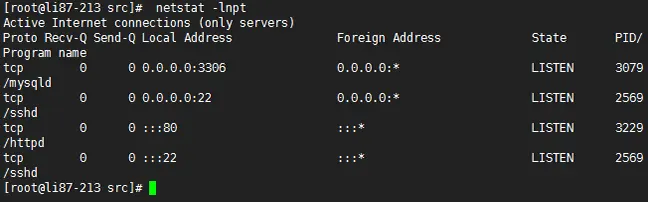
This host operation and maintenance note, published on March 14, 2016, is titled "Solving the 'Starting PowerMTA: [FAILED]' problem when deploying a PMTA environment".
This host operation and maintenance note, published on March 14, 2016, is titled "Solving the 'Starting PowerMTA: [FAILED]' problem when deploying a PMTA environment".
Data center and resources
You only need to change the corresponding IP address and domain name to your own.
Domain and site configuration
According to online installation tutorials, ports 7100 and 2525 are available.
This example document demonstrates how to build an Odoo management system using an EC2 marketplace image, with image subscriptions and computing resources included in the deployment costs.
This server application note, published on June 18, 2025, is titled "Hands-on Experience Deploying the Qwen-7B-Chat Large Model on an Amazon Cloud EC2 Server".
Object storage bills can include different usages such as capacity, external network traffic, and API requests, making it difficult to estimate the total amount by looking at the price per GB of storage alone.